INDIGO Park Canada
1 Place Ville-Marie, Suite 1130,
Montréal, Quebec H3B 2A7
1 Place Ville-Marie, Suite 1130,
Montréal, Quebec H3B 2A7
1 Place Ville-Marie, Suite 1130,
Montréal, Quebec H3B 2A7


Find, book, and manage parking for concerts, games, festivals, and more, all in one place. Spend less time planning your parking and more time enjoying the event.
Jump to:
Whether you’re going to a concert, sporting event, festival, theatre performance, comedy show, or another special event, Indigo Neo can help you find parking close to where you’re going.
Visit Indigo Neo or open the Indigo Neo app.
Search for the venue, address, neighbourhood, or area you’re heading to.
Going to a hockey game? Search the arena. Heading to a concert? Search the concert venue. Going to a festival or show? Search the event location or surrounding area.
Indigo Neo will show available parking locations nearby so you can choose the option that works best for your plans.
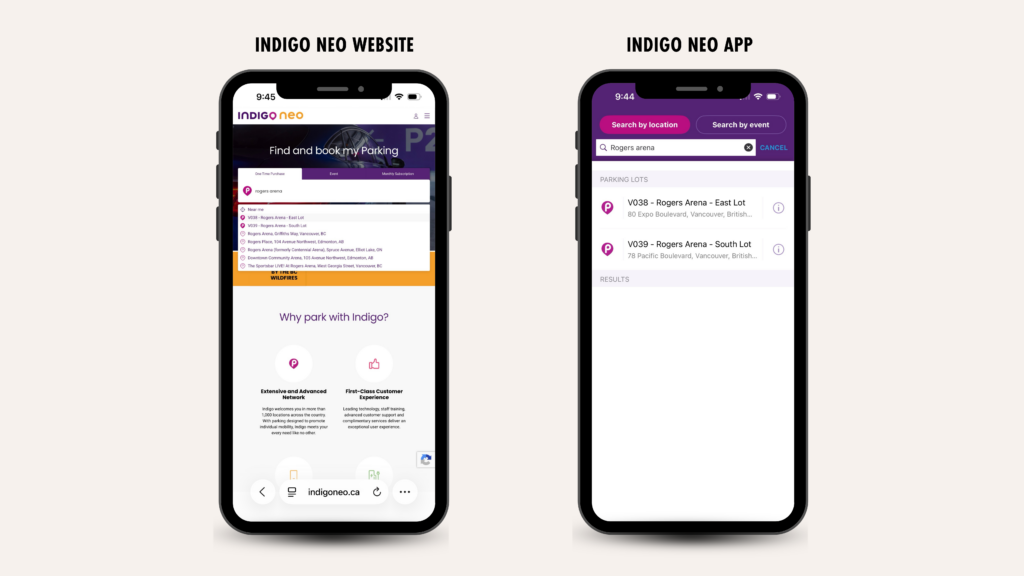
Before choosing where to park, take a look at the information available for each parking location.
You will be able to see details such as:
This helps you get the details you need to plan your trip with confidence before you arrive.
Want to learn more about searching for parking? Check out our complete guide to using Indigo Neo.
One of the easiest ways to make your event day simpler is to figure out your parking before you leave home.
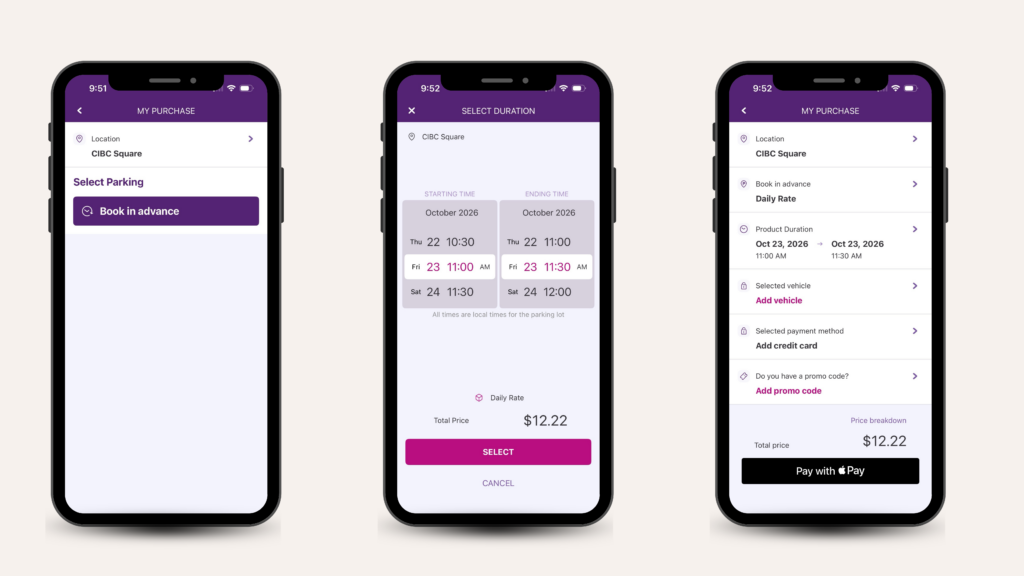
If advance booking is available at your chosen parking location, you can book your parking through Indigo Neo before the event.
You can:
Once your reservation is confirmed, you’ll have your booking information available digitally and through your confirmation email.
Already know exactly which concert, game, or show you’re attending?
The Indigo Neo Events tab is another easy way to find parking.
For select events, Indigo Neo brings nearby event parking options together so you can search by the event itself instead of starting with the venue.
Go to the Indigo Neo website or the app.
On the homepage, you’ll see options including One-Time Purchase, Event, and Monthly Subscription. Select Event.
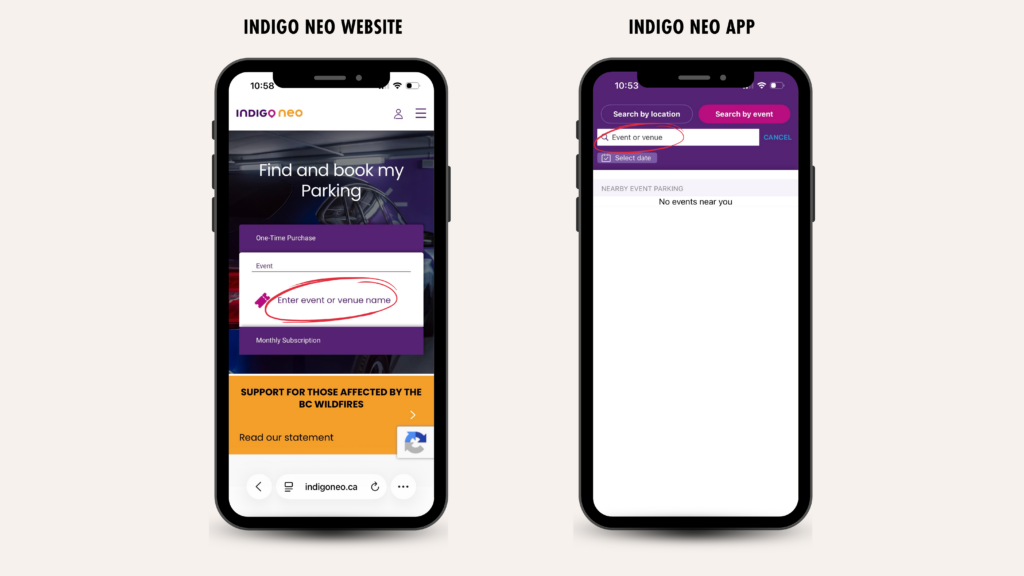
Type the name of the concert, game, show, or other event you’re attending.
Available events can change throughout the year, so check Indigo Neo as your event gets closer to see what parking options are available.
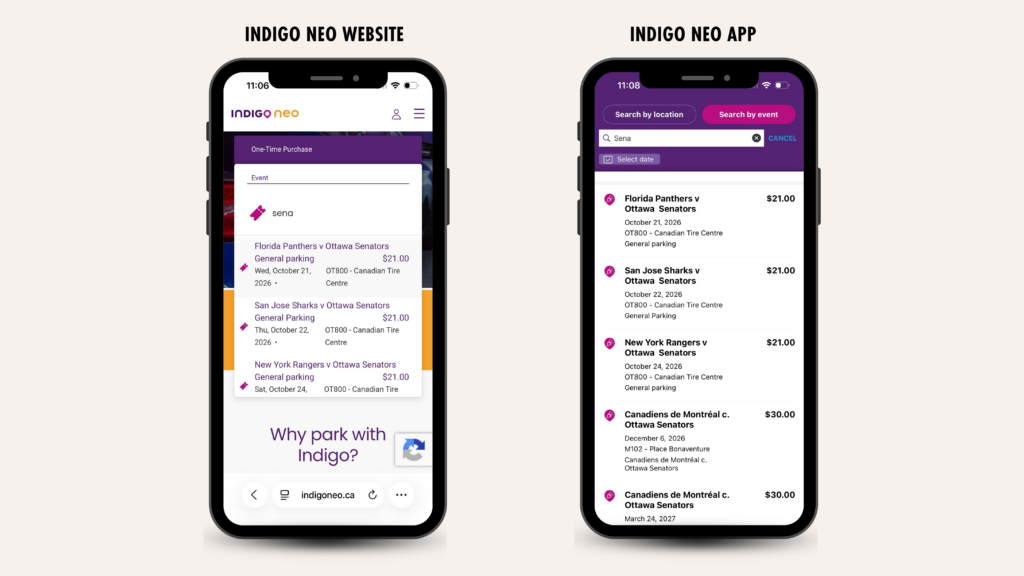
Once you’ve found your event, review the available parking options.
Look at things like:
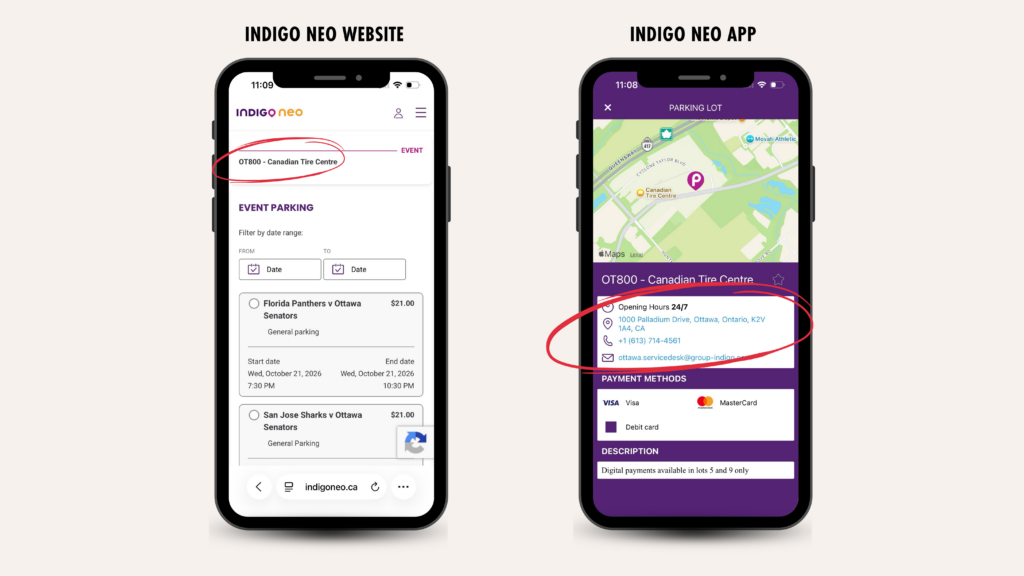
Found a location that works?
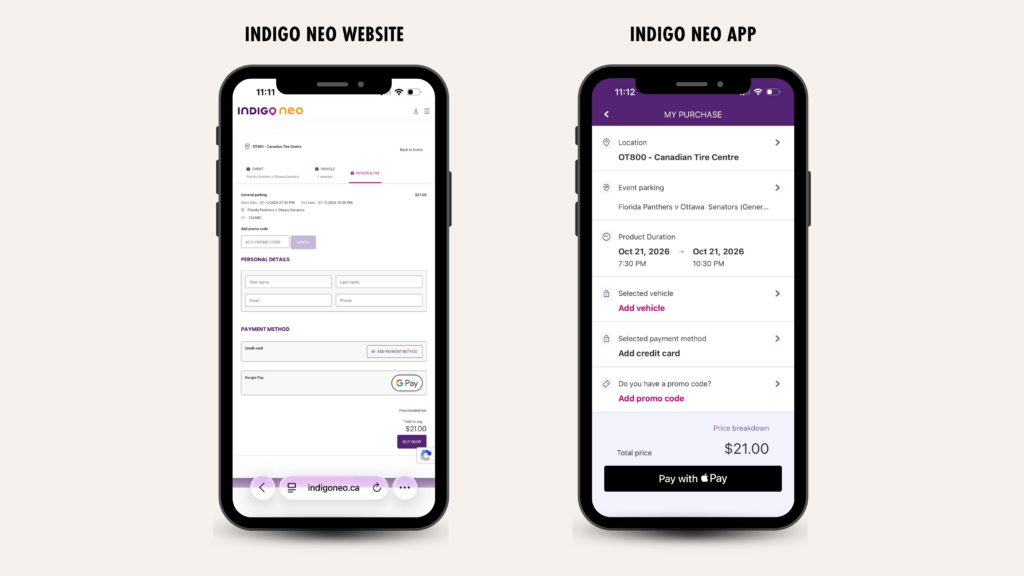
Select the parking option and review the booking details carefully before continuing.
Make sure you’re booking for the correct event, date, and parking time.
Enter the requested vehicle and payment information and complete your reservation.
Once your reservation is confirmed, you’ll receive your booking information digitally, along with an email confirmation. Some controlled-access parking facilities may also use a digital parking pass or QR code for entry and exit.
Now you know exactly where you’re going.
No problem.
You can still search Indigo Neo using the venue, address, neighbourhood, or destination to find available Indigo parking nearby.
The Events tab is simply another way to make finding parking easier when an event has been added to the platform.
Plans change. Maybe you’re taking a different car, your schedule moved around, or you need to find your booking again.
You can access your Indigo Neo reservations through the website or app.
Depending on the booking and location, available options may include:
On the website, bookings can be found through My Bookings or My Purchases. In the app, reservations can be found through My Activity.
For complete step-by-step instructions, check out our Managing Your Booking on Indigo Neo guide.
Not sure what’s happening in your city this weekend?
Follow our Indigoparkcanada Instagram profile.
Throughout the year, we share parking guides for select concerts, festivals, sporting events, shows, and other major events happening across Canada.
See us post about an event you’re heading to?
Check the link in our Instagram bio. For select events, we may link directly to parking options so you can review nearby locations and book ahead.
And if we haven’t posted about your event, you can still search for the venue directly on Indigo Neo.
Yes, advance booking is available at many Indigo parking locations. You can search Indigo Neo for parking near your destination or use the Event option to look for dedicated parking for select events. Booking availability varies by parking location and event.
Open Indigo Neo and search for the venue, address, or area you’re visiting. You’ll be able to explore available Indigo parking locations nearby and review important parking details before choosing where to park.
Once your reservation is confirmed, your parking reservation is approved. A specific physical stall isn’t reserved for you, but parking availability is managed so confirmed reservations aren’t overbooked.
Parking rates vary depending on the location, date, time, and event. Indigo Neo shows the applicable parking rate before you complete your booking so you can review the cost in advance.
Your reservation has a specified parking period. If you stay beyond your prepaid time, additional time may be charged at the applicable parking rate. Where available, you may also be able to extend your parking or purchase additional time.
Always check the parking period shown on your reservation. At eligible locations, you may be able to enter early, but time outside your prepaid booking period can be charged at the parking facility’s applicable public rate.
Cancellation eligibility can depend on the parking location and booking. If your reservation is eligible for cancellation, you’ll see the available options through your Indigo Neo account.
For more information, visit our Managing Your Booking on Indigo Neo guide.
Some controlled-access locations use a digital parking pass or QR code. If your parking location requires one, it will be available with your booking information on the app and can also be sent to you by email.
Search Indigo Neo using the venue or surrounding area to explore nearby parking locations. You can also check out our Navigating Parking at Stadiums & Arenas guide for Indigo parking options near major venues across Canada.
The concert, game, festival, or show should be the part you’re thinking about — not where you’re going to park.
With Indigo Neo, you can search for parking near your event, compare available parking locations, review rates and parking information, and book ahead where digital booking is available.
And for select events, the Events tab makes it even easier to find parking options specifically for where you’re going.
Have an event coming up? Search, book, and plan your parking with Indigo Neo.